Add a provider’s own questions to its marketplace checkout — collected at signup and saved on the customer record.
Providers set their checkout message and field rules themselves — see
Checkout. The same two cards also appear under
Providers → (pick a provider). Custom questions are set up by kurnl only;
providers ask for them.
Ask anything else the provider needs at signup — “How did you hear about us?”,
a referral code, a preferred contact time. Answers are saved on the customer
record.
1
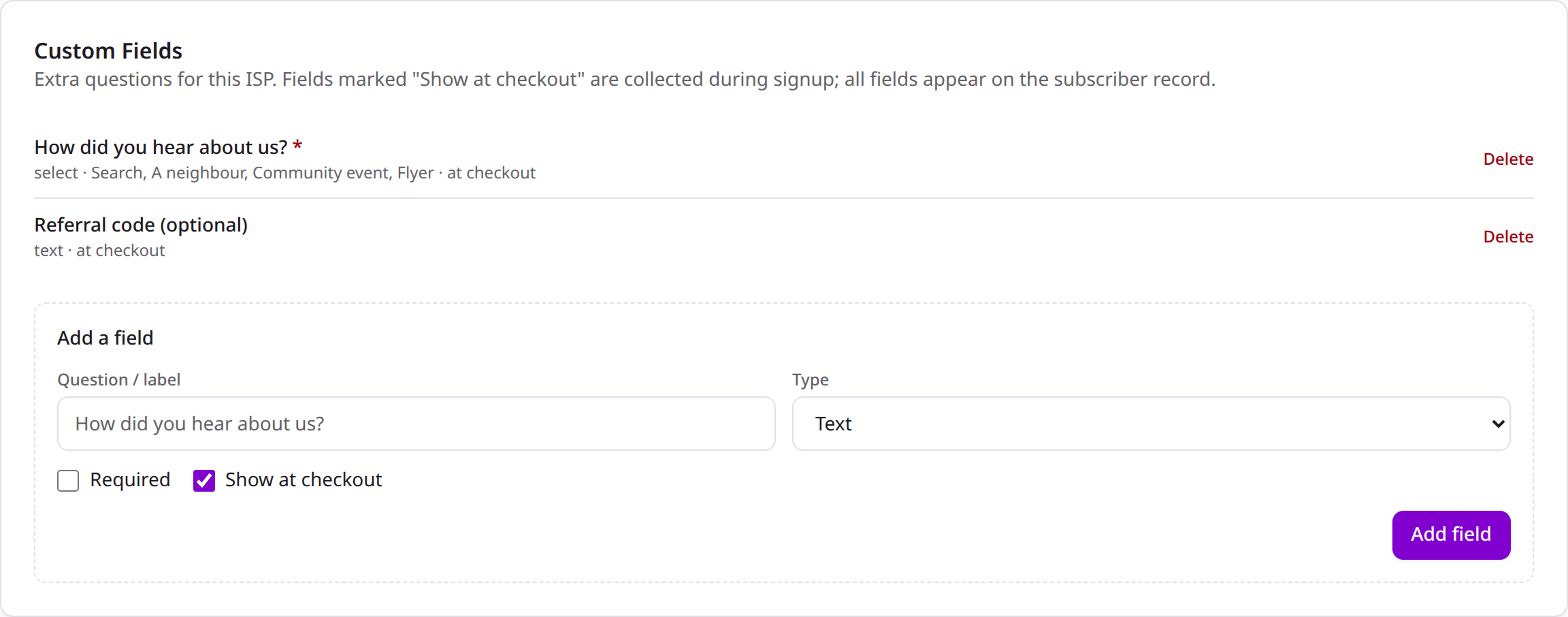
Add a field
Under Providers → (pick a provider), in the Custom Fields card,
click Add a field. Give it a label, pick a type — text,
dropdown (with your options), or checkbox (yes/no) — and choose
Required and Show at checkout.
Defining custom fields
2
See it on checkout
Fields marked Show at checkout appear below the built-in fields on the
marketplace checkout. Required ones must be answered before payment; the
answers land on the customer’s record.
A field that isn’t shown at checkout still lives on the customer record — use
it for internal notes filled in later.
Custom questions appear only on the Kurnl marketplace checkout. A provider
with an external store asks its own questions there.